Launchify App launcher iCUE widget for the XENEON EDGE
Your apps, one tap away on the CORSAIR XENEON EDGE.
Made for your setup.
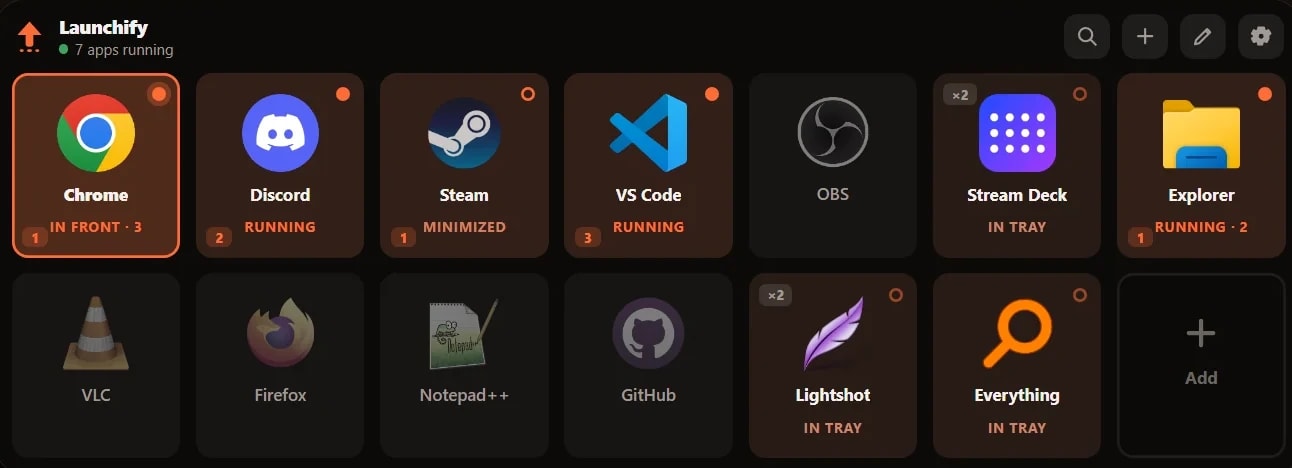
Launchify is an app launcher iCUE widget for the XENEON EDGE. A launcher that knows what your PC is doing. Every tile shows whether its app is closed, running, minimized, in the tray or in front, and a tap launches it, brings it forward or sends it to another monitor.
Take a closer look.
What it does.
Real state
Closed, running, minimized, in the tray or in front, live on every tile.
Every gesture assignable
Tap, double tap and long press each get their own action.
Force close
Task Manager's End task, one confirmed tap away.
Send it there
Tap another monitor's number to move an app's windows.
Everything installed
Your whole Start Menu and Desktop, resolved to the real exe.
Nothing phones home
No account, no telemetry, no cloud.
Specs.
- Category
- XENEON EDGE widgets
- Version
- 1.0.2
- Runs on
- Windows, iCUE, XENEON EDGE
- Requires
- Windows 10 or later, 64-bit
- iCUE 5.45 or newer
- A CORSAIR dashboard LCD, such as the XENEON EDGE
- Qaem Hub, or the Launchify Module
Guides.


 +4
+4Install an iCUE widget on the XENEON EDGE
Double-click the .icuewidget file or import it in iCUE, drag it onto your XENEON EDGE and pick a size. The same steps for every widget, plus where its settings are.
Set up Launchify
Install Qaem Hub and the Launchify widget so your XENEON EDGE shows your apps as live tiles you can tap to launch or switch to.
Questions.
Is there an app launcher widget for the XENEON EDGE?
Yes. Launchify shows your apps as live tiles on the XENEON EDGE. Each tile shows whether its app is closed, running, minimized, in the tray or in front, and a tap launches it, brings it forward or moves it to another monitor. It runs with Qaem Hub, a free app for your PC.
How much does Launchify cost?
$4.99. One-time purchase, here or on the Elgato Marketplace.
Where do I get Launchify?
Here on qaemdev.com, or on the Elgato Marketplace, at the same price.
What do I need to run Launchify?
Windows 10 or later, 64-bit. iCUE 5.45 or newer. A CORSAIR dashboard LCD, such as the XENEON EDGE. Qaem Hub.