CORSAIR XENEON EDGE
Apps and widgets for the XENEON EDGE
The XENEON EDGE is CORSAIR's 14.5-inch, 2560 × 720 touchscreen. QAEM makes EdgeOS, a free dashboard app for it, and iCUE widgets for Twitch, Discord, YouTube, your browser's media and your apps.
EdgeOS
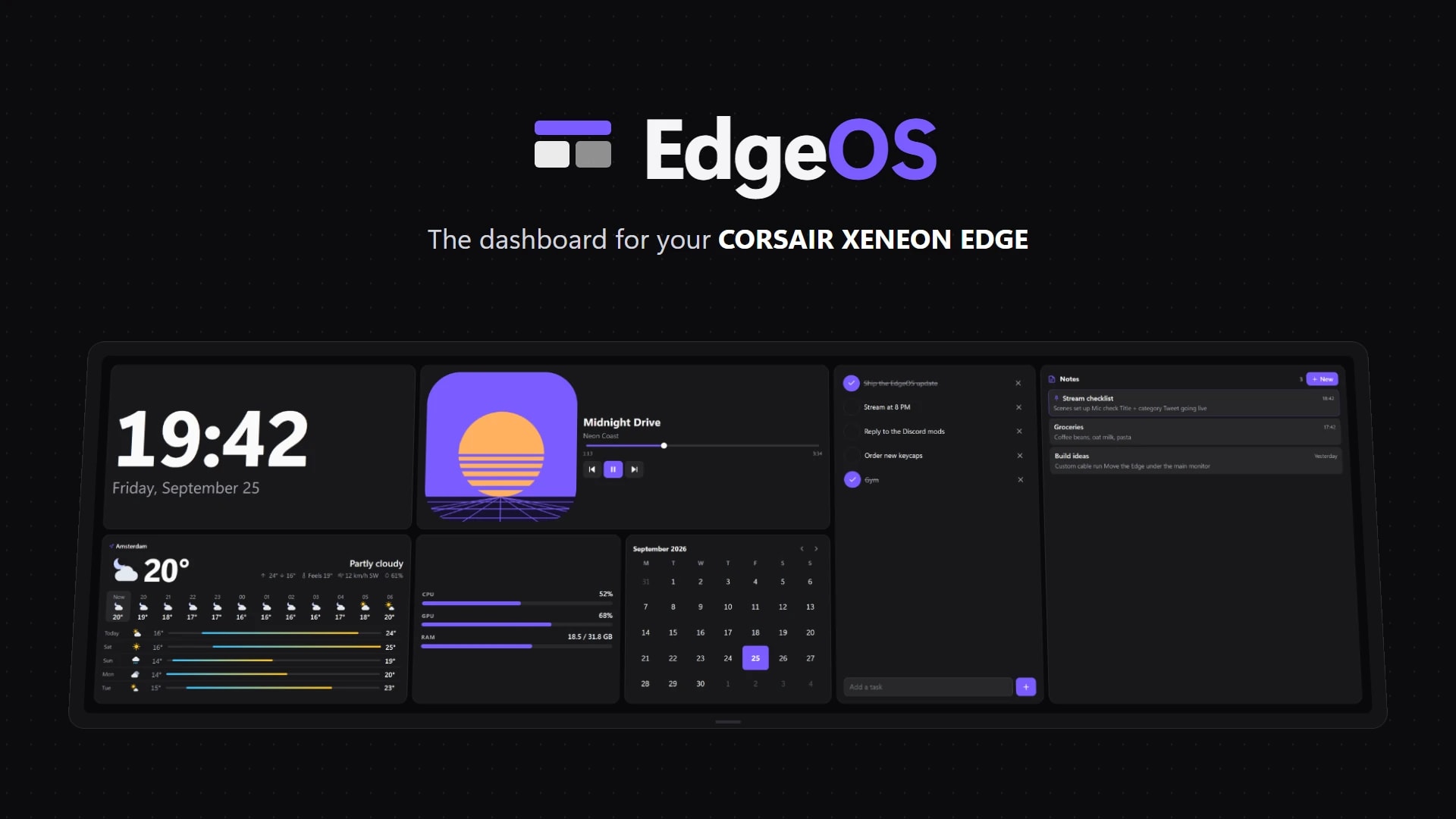
The dashboard for the CORSAIR XENEON EDGE, in both of its modes.
EdgeOS turns the CORSAIR XENEON EDGE into a customizable touch dashboard. Arrange a clock, calendar, system monitor, media controls, tasks and weather the way you like, save each setup as a profile for gaming, work or streaming, and switch between them with a tap. It runs full screen when the Edge is set up as a monitor and inside iCUE when it isn't, and picks the right mode automatically. EdgeOS is free; Premium is an optional one-time upgrade that adds streaming widgets, more profiles, automation, themes and Elgato Marketplace widgets.
- Free
- Premium $19.99 once
- 63 built-in widgets
- Desktop and Widget Mode
- Windows 10/11
Two ways to use the Edge
01
Inside iCUE
iCUE shows widgets on the Edge. Each one is an .icuewidget file you import, from the Elgato Marketplace or a download, and place on a screen page.
02
As a Windows screen
The Edge also works as an ordinary display. A full-screen app such as EdgeOS then uses all of it, with no iCUE needed.
XENEON EDGE widgets
Touch widgets for the CORSAIR XENEON EDGE, imported through iCUE.


XENEON EDGE
Twitchify
Twitch mission control on your XENEON EDGE.


XENEON EDGE
Launchify
Your apps, one tap away on the CORSAIR XENEON EDGE.


XENEON EDGE
Deckord Widget
Discord mission control on your XENEON EDGE. No Stream Deck required.


XENEON EDGE
Browser Media Controls Widget
Your browser's media on the XENEON EDGE, with live artwork and full touch control.


XENEON EDGE
EdgeTube
YouTube on your XENEON EDGE.


XENEON EDGE
Wordle
Wordle on your XENEON EDGE.

XENEON EDGE
Gmail Connect
Your Gmail on the XENEON EDGE.
Setup guides
EdgeOS skins
Install, apply and make .edgeskin files: a whole look for the XENEON EDGE in one file, with its layouts, widgets, colours and background.
Build your own EdgeOS widget
Make a custom widget for EdgeOS from a widget.json and an index.html: options, live system and media data, text size, and how iCUE widgets run inside EdgeOS.
Set up EdgeOS
Install EdgeOS, pick Desktop Mode or Widget Mode for your XENEON EDGE and, if you bought it, activate Premium.

Set up Deckord
Register one Discord application and connect it to Deckord, on Stream Deck keys and dials, on the XENEON EDGE widget, or both.
Set up Gmail Connect
Import Gmail Connect on your XENEON EDGE and open your inbox — sign in from your PC in one tap, or by scanning a QR code with your phone.
Use your own Google key with Gmail Connect
Create a Google OAuth client in your own Cloud project so Gmail Connect signs in with no user cap and nothing shared with anyone else.
+3Install an iCUE widget on the XENEON EDGE
Import a .icuewidget file into iCUE, place it on your XENEON EDGE and find its settings.
Set up Launchify
Install the Launchify helper and widget so your XENEON EDGE shows your apps as live tiles you can tap to launch or switch to.
Set up Twitchify
Import Twitchify, place it on your XENEON EDGE and sign in to Twitch with a code, then optionally add Watch Sync for your browser.
Common questions
- What can I put on the XENEON EDGE?
- Clocks, weather, PC stats, media controls, chat, app launchers, games: anything an iCUE widget or a Windows app can show. EdgeOS lays out 63 built-in widgets however you like, and QAEM's iCUE widgets add Twitch chat, Discord voice, YouTube, Gmail and live app tiles.
- Is there a free dashboard app for the XENEON EDGE?
- Yes. EdgeOS is free, with 43 built-in widgets, the layout editor, skins and widgets of your own. Premium is an optional $19.99 one-time upgrade for the rest.
- Do I need iCUE to use the XENEON EDGE?
- For iCUE widgets, yes. The Edge also works as a normal Windows display, and there EdgeOS fills it with its dashboard without iCUE.
- How do I install a widget on the XENEON EDGE?
- Double-click the widget's .icuewidget file and iCUE imports it, or in iCUE select the XENEON EDGE, open Widgets and import the file with the + button. Then drag the widget onto a screen area and pick a size.
- Can the XENEON EDGE show Twitch chat or Discord?
- Yes. Twitchify puts your Twitch chat, moderation tools and activity feed on the Edge, and the Deckord Widget shows your Discord voice channel with per-user volume and the soundboard. EdgeOS Premium also has Twitch and OBS Studio widgets.
- Are these official CORSAIR apps?
- No. QAEM is an independent developer. The widgets run in iCUE and are sold on the Elgato Marketplace, and EdgeOS is a separate Windows app. None of them is affiliated with or endorsed by CORSAIR.